Say goodbye to exporting CSVs
Getting a project off the ground is hard enough without having to chase down numbers at the end of every month.
At most sites, the operational information you need for compliance is spread across several everyday tools:
- Weighbridge receipts and deliveries stay in your yard log
- Flow meters report back to your plant monitor
- Gas quality and moisture tests come in from external labs
- Weather details sit in an online portal
When these tools don’t talk to each other, someone on your team has to log into each one, download a spreadsheet, and upload it by hand. It takes time, and it’s easy for small files or updates to slip through the cracks before an audit.
Mangrove is designed to integrate into your existing setup so you don't have to change how you work. We built HTTP API support into Data Feeds - the scheduled connections that bring operational data into your project:
- HTTP REST APIs: Point a feed at an endpoint that returns CSV or JSON, and Mangrove fetches from it daily automatically or whenever you click Sync.
- Database & Warehouse Support: Data feeds can run a SQL statement in Databricks, alongside our existing Snowflake and Microsoft SQL Server integrations.
By letting Mangrove connect directly to your existing systems, your operational data flows in automatically - eliminating manual monthly uploads and keeping your audit trail complete.
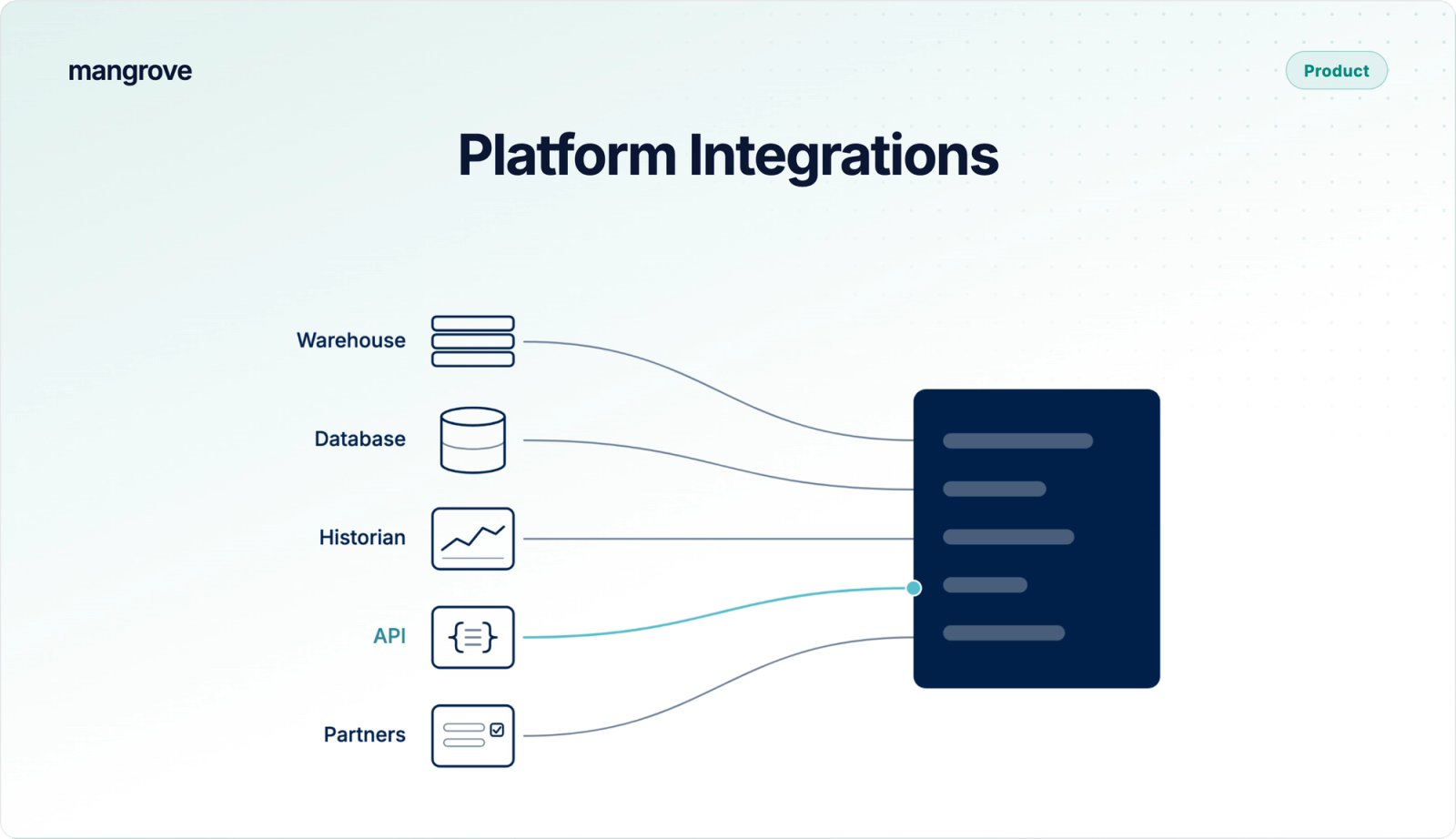
Connect Mangrove to your stack: data warehouses, databases, historians, and APIs
Most of your operational data already sits in a handful of common systems. Rather than asking your team to change where that information lives, Mangrove connects directly to each one:
- Data warehouses. A SQL statement can be run in Databricks, and Snowflake can be queried directly or through a Secure Share.
- Operations databases. Microsoft SQL Server, where many sites keep production, weighbridge and maintenance records, can be queried directly.
- Historians and plant software. Many plant historians and SCADA platforms offer a web API, such as the AVEVA PI Web API or Ignition Automation Gateway API. If the endpoint is reachable over the internet and returns CSV or JSON files, a data feed can call it.
- Partner and internal APIs. If a logistics platform, a supplier portal, or an internally built service returns its rows as CSV or JSON files, Mangrove can fetch them.
- Mangrove API and Data Requests. Data can still be pushed through the Mangrove API or collected from project partners with Data Requests.
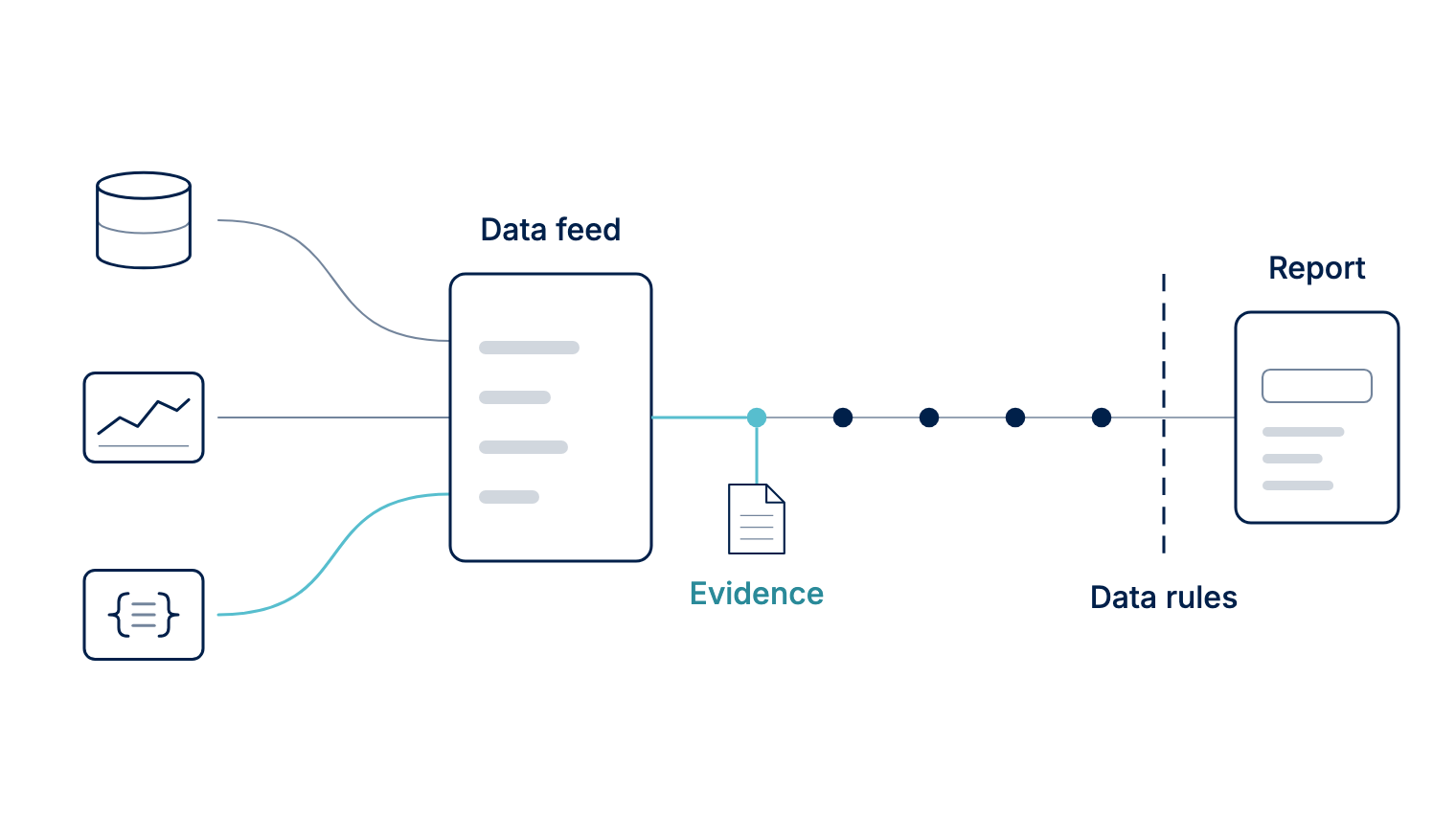
No matter where your operational data starts, it follows the same ingestion consistent path; tested against the same compliance checks before anything enters a report. To keep your CI scores accurate and traceable, Mangrove maps every data point onto your project with transformations and checks each one against your data rules automatically.
Your Auditor does not get left behind
Auditors need to see where your numbers came from, not just the final values. Every time Mangrove runs a scheduled fetch, it automatically saves the raw response from your system as permanent audit evidence: the exact payload returned by your API, or a timestamped snapshot of the query tagged alongside the specific rows retrieved.
Mangrove links that original record directly to the resulting project data points. When an auditor reviews your submission, the underlying proof is already attached to each value, allowing you to trace any reported figure back to the exact system record captured on the day of the fetch.
Set up an HTTP API connection and test it before saving
HTTP API sources are available upon request and can be enabled by your account team. Once activated, you can configure and manage the connection directly.
To set it up, simply define the request according to your API’s documentation or use Mangrove’s MCP to configure the request with your AI agent. In this example, each scheduled run uses a saved key to retrieve only the records added after the last ID Mangrove received:
GET https://api.example.com/v1/records?after_id={{cursor_value}}
Authorization: Bearer {{api_key}}
- Save credentials once. Add an API key or OAuth2 client credentials to the source with encrypted storage. With OAuth2, Mangrove requests the access token for you and renews it when it expires.
- Fetch only what's new. Mangrove stores the ID of the last record processed, or the end of the last time window, and each new run resumes from that point.
- Preview the rows first. For a REST API, you can preview the rows the next fetch will read before saving anything. For JSON responses, you specify where the rows are located, and the preview suggests any lists it detects.
- Know where a failed test stopped. The connection test runs step by step. If it fails, a user can see whether it got past the credentials or stopped at the request.
- Validate with Sync before you schedule it. The first fetch runs only when you click Sync. Review the data it brings in, undo the run if anything looks wrong, and turn on daily fetching once you’re satisfied with the results.
Already on Mangrove? The data connectors guide covers setup for each source, and Connect an HTTP API walks through it with a worked example.
Removing friction from your operations
Connecting your systems directly to Mangrove turns monthly data collection from a scramble into a background routine:
- Save time every month: Minute-by-minute data flows in automatically each day, taking manual spreadsheet exports and uploads completely off your team’s plate.
- Work with your existing setup: Mangrove links directly to the warehouses, databases, historians, and APIs you already run - no new software to roll out and nothing to rebuild.
- Reduce reporting errors: Automated ingestion prevents missed or duplicated files, while built-in data rules validate every incoming point against consistent criteria.
- Stay audit-ready continuously: Each fetch preserves the source record from your system and anchors it directly to the data points it created, preserving full lineage.
- Get to verification faster: With complete records and underlying evidence always in place, you hand over audit-ready packages sooner and accelerate credit issuance.
Connect the systems you already run
New to Mangrove? Book a demo and we'll show you how connecting your own systems gets your reports to verification faster.